
What is the best alarm sound to wake up to?
There is no single winner, and anyone who names one is guessing. What people actually need from an alarm sound is a short list of practical things:
- It is audible from your sleeping position. A sound that is lovely at your desk can vanish under a duvet.
- It starts soon. A song with a long quiet intro, a fade or a few seconds of silence delays the moment you notice it.
- It is pleasant enough that you do not silence it on reflex. A harsh sound gets dismissed fast and can leave the morning feeling rough.
- It changes now and then. A sound you hear at the same minute every day can fade into the background.
The sections below cover what the research says, which type of sound suits which person, how to set a sound on iPhone and Android with the built-in clock, how to test it, and where AlarmiFex fits in.
What does research say about melodic alarm sounds?
The most cited study on this question is a small one. In a 2020 paper in PLOS ONE, researchers asked 50 people to describe their usual waking sound and how groggy they felt afterwards. The study found that sounds people rated as melodic were linked to less perceived sleep inertia, while sounds rated as neutral were linked to more. The authors also found that melodic sounds were considered more rhythmic.
Sleep inertia is the groggy, low-alertness stretch after waking, which the paper describes as lasting up to four hours. The study did not find a link between sleep inertia and the type of sound (song, tone or other), or how people felt about their sound.
Which type of alarm sound should you choose?
Think about how each kind of sound starts, not only how it sounds. This table keeps the original checks and adds what each option is usually good for.
| Option | Often a good fit when | What to check |
|---|---|---|
| Built-in tone | You want a dependable default that works with no setup. | Preview it from your pillow and check the actual alarm volume. A short preview may use different controls from a scheduled alarm. |
| Melodic music | You respond better to a tune than to a beep, or want a gentler start. | Listen for a quiet introduction, silence or a long fade. Choose a clear starting point if your alarm supports trimming. |
| Upbeat or motivational sound | You want energy and a reason to get up. | Check it does not start with a slow build. Make sure you still like it on day five. |
| Nature or calm sounds | You dislike jolts and want a softer morning. | Quiet sounds are easy to sleep through. Test at your real alarm volume and keep a backup alarm. |
| Recorded voice | You want a personal message, such as a reminder or a pep talk. | Use a short, clearly recorded message. Listen for background noise and low recording volume. |
| Vibration or bed shaker | Sound alone does not meet your access needs, or you share a room. | Check the device's intended use, placement and controls. |
These are selection checks, not a ranking from a clinical trial. We have not tested which option wakes more people. A familiar song can be pleasant; that does not prove it will wake you more reliably than a built-in tone. If your sound is a song, see how to set a song as your alarm on iPhone; for a voice, follow the voice-alarm walkthrough.
How do you set an alarm sound on iPhone and Android?
Start with the built-in Clock app. It is free, already on your phone and reliable.
On iPhone:
- Open Clock and tap the Alarms tab.
- Tap Edit.
- Choose the alarm.
- Tap Sound.
- Pick a tone or a song from your music library.
- Tap Save.
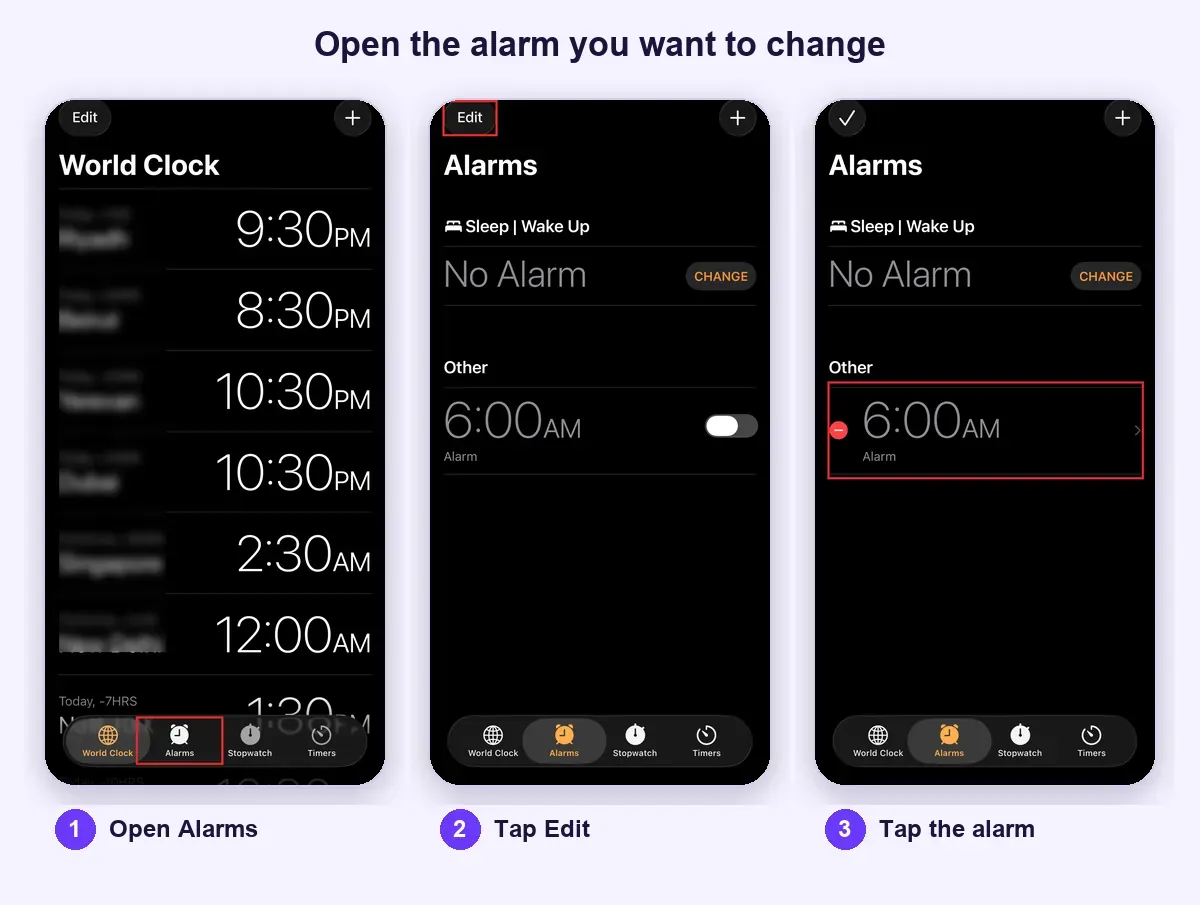
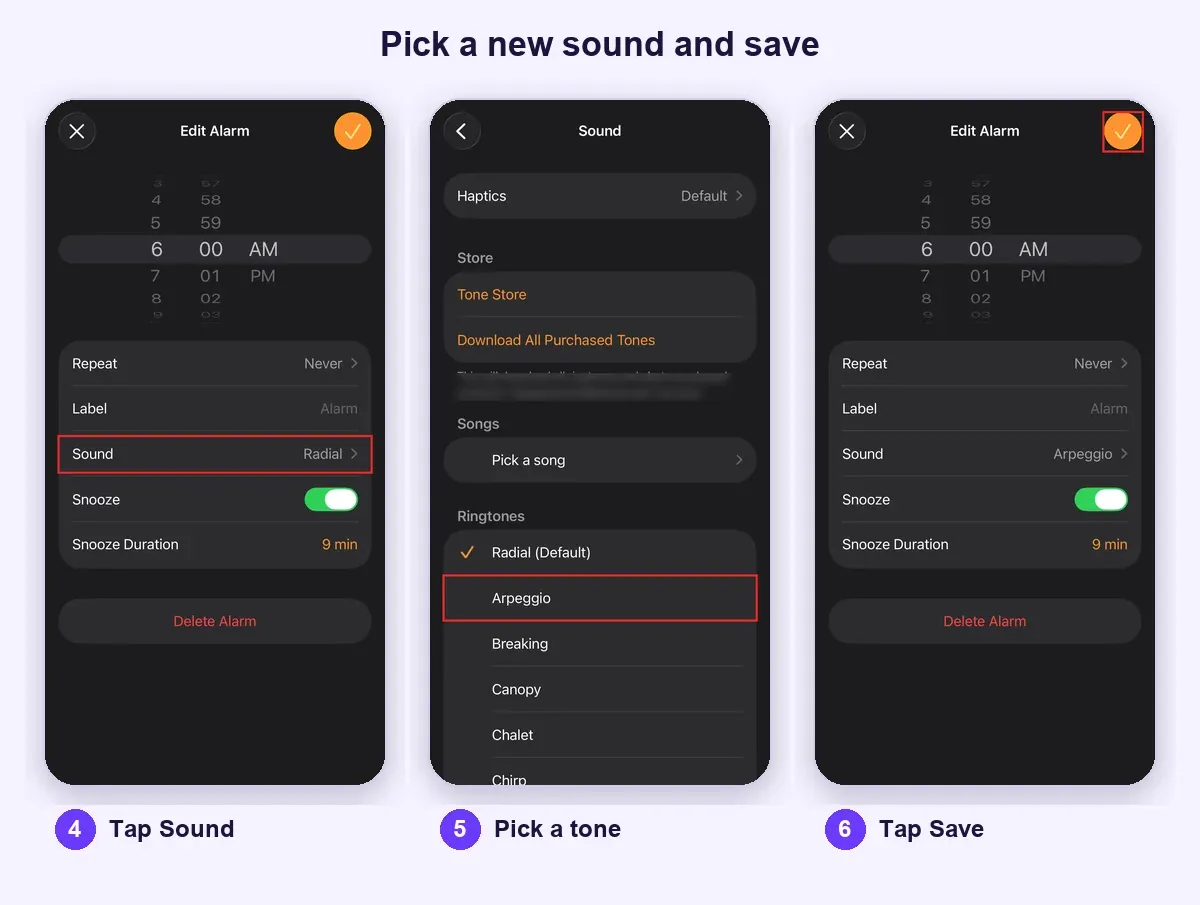
Apple lists these steps in its guide to setting and changing alarms on iPhone. Our step-by-step iPhone guide adds the volume traps to avoid.
On Android:
- Open the Clock app and tap Alarm.
- Tap the alarm you want to edit.
- Tap the alarm sound.
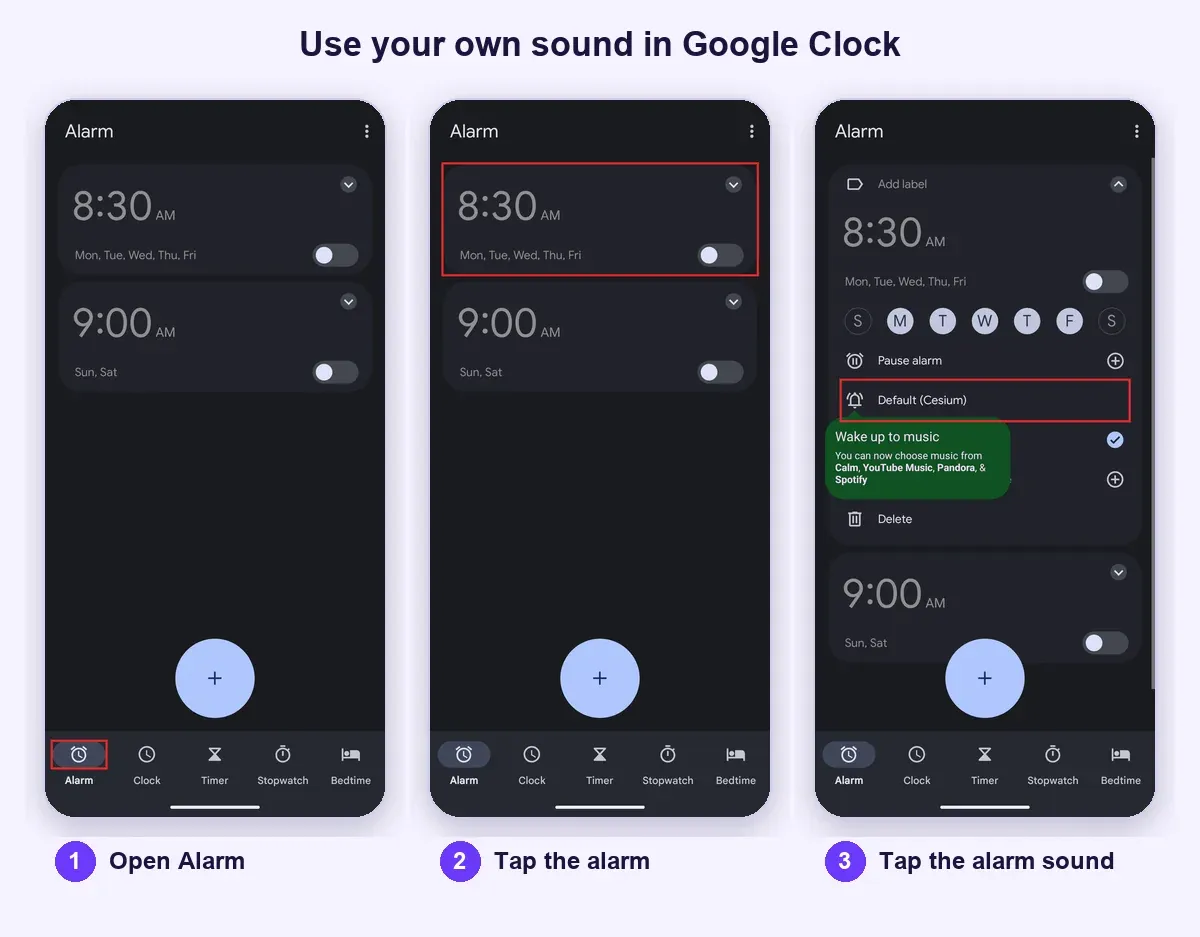
You can pick a device sound or add a sound file you have downloaded. Google's Clock Help page for alarms covers this and notes that if the ringtone is silent and vibration is off, the alarm will not sound. Samsung Galaxy phones use their own Clock app with a similar path, though menu names vary by version.
If you want a longer comparison of every route, including apps, see ways to change your alarm sound.
What is the best alarm sound for heavy sleepers?
The heavy-sleeper version of the question is mostly about audibility and starting point. Choose a clearly audible sound, make sure it starts promptly and treat the sound as one part of your waking routine. Do not expect any tone to be a guarantee. If you often miss alarms, our guides on why you sleep through your alarm and how to wake up a heavy sleeper look at what else to check, and the heavy sleepers page collects the AlarmiFex ideas.
Check the alarm control before changing sounds
A media-volume slider is not always the alarm-volume control you need. Check the settings for your iOS version and alarm type; Apple's Clock guide for iPhone has a version selector and volume instructions. Then make sure the alarm has an audible sound selected. If you use a Sleep Schedule wake-up alarm, inspect that alarm's own controls rather than changing an unrelated regular alarm. For silent mode and Focus, see silent mode and alarm settings.
Listen to the part that actually plays
A favorite song may open with a long silence or a quiet introduction, and a loud chorus later in the file does not help in the first few seconds. Preview the beginning of the selection and, if your app supports trimming, choose a section that is clearly audible from the start. AlarmiFex lets you trim an imported clip to 1:00 or less, so you can start right at the loud part.
What volume can and cannot do
It is tempting to answer a missed alarm with more volume. No app can exceed what the phone's speaker can physically deliver, and AlarmiFex plays at your device's ringer volume like any other. What the sound itself does is still up to you: a clear, sharp sound with a strong start is easier to notice than a soft one, and a clean source is better than a harsh recording pushed hard. Loudness also has limits for your body: NIDCD explains that loud sound can damage hearing, with risk depending on intensity and exposure. Do not place a blaring speaker beside your ear, and think about a partner's hearing and sleep, too.
If the alarm feels too quiet at a sensible level, see why an iPhone alarm can be quiet and how to fix it. Where the phone sits matters too, so read where to put your phone at night. No decibel measurements or head-to-head loudness tests were run for this article; the guidance rests on Apple documentation and how AlarmiFex behaves.
If sound alone is not enough, a dedicated vibrating or bed-shaker alarm may suit you better. Persistent difficulty waking despite enough sleep is worth discussing with a healthcare professional; a louder file does not address every cause.
How do you test an alarm sound before you rely on it?
Do a daytime setup check. It takes five minutes and catches most surprises.
- Put the phone on its normal overnight surface, a stable one with the speaker uncovered. Bedding around the phone or a spot under a pillow can muffle it.
- Set a scheduled alarm, not just a sound preview.
- Listen from the bed with ordinary room noise present.
- Check that the sound starts when expected and that you can stop it.
- If using a downloaded sound, check the alarm's instructions for offline playback.
- Try the sound for several mornings and note what happens. A sound you like on the first day may annoy you by the fifth, and that is useful to know before an important morning.
- Keep a second alarm a few minutes later as a backup until you trust the setup.
How can AlarmiFex help you choose an alarm sound?
AlarmiFex is one option for when the built-in list is not enough. It is a free download on iPhone and Android, and it makes choosing a sound a bigger part of the experience.
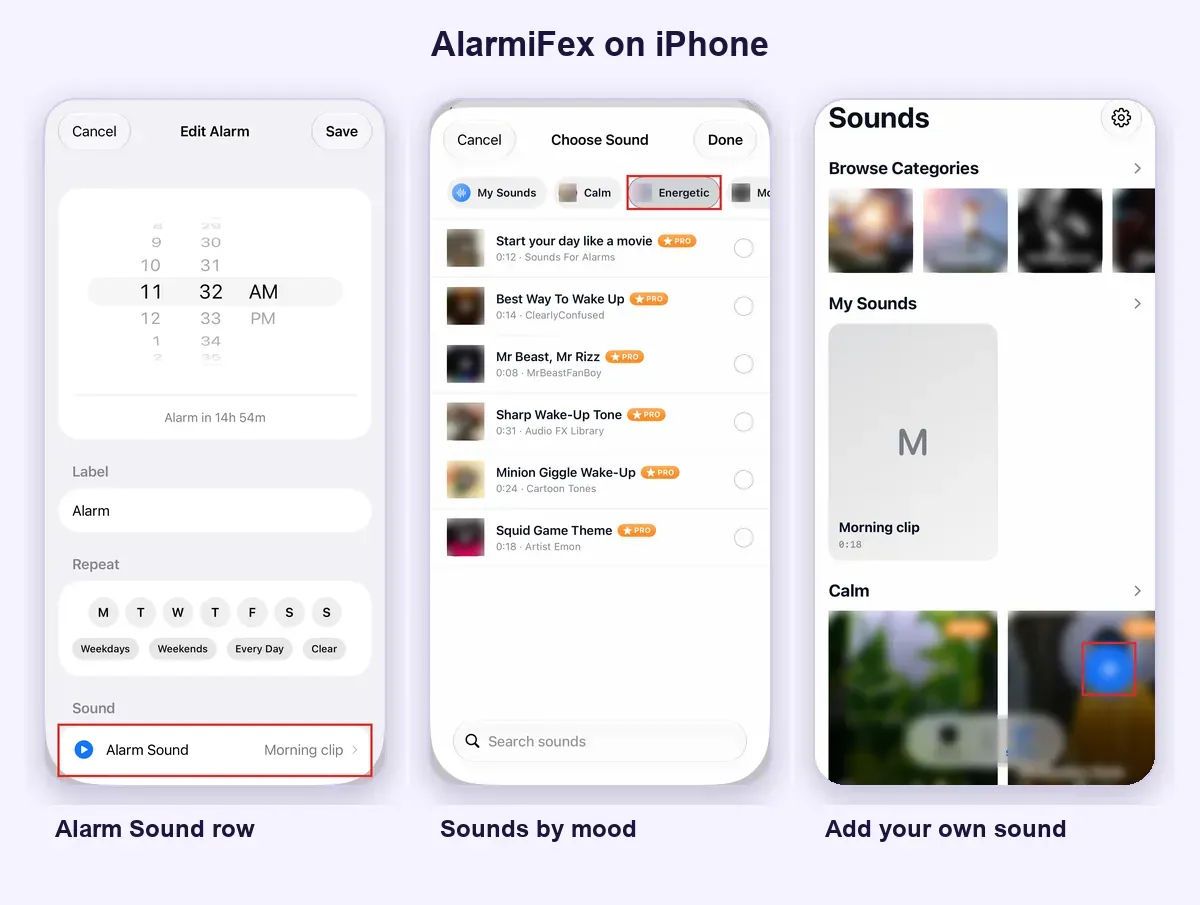
- Sounds sorted by mood. The library has 34 sounds in five moods: Calm, Energetic, Motivational, Classic and Anime. You can preview each one before you use it. See the mood-based sound library.
- Your own clip, trimmed. Import an audio file or the audio of a video, including a voice memo you recorded with your phone, and trim it to the part you want. AlarmiFex imports and trims; it does not record inside the app. See custom alarm sounds, or how to use a TikTok sound as an alarm. You can also share a reel or video link to the app to import its audio.
- Several sounds in one morning. Wake-up Series lets you choose a time window and at least two different sounds that play across it.
- Rings on silent. On iPhone, AlarmiFex uses Apple's AlarmKit, so alarms can ring with the app closed, the phone locked or Focus on, once you allow alarms. They play at your ringer volume, so keep it up. See rings on silent. This applies to iPhone only.
Free to download. Premium sounds and custom sounds need a subscription. See current pricing and terms in the app.
How often should you change your alarm sound?
There is no magic number. A sound you hear every day at the same minute can fade into the background, because the brain learns to skip signals that repeat without changing. This is called habituation. If you cannot recall what your alarm sounded like this morning, that is a sign it may be time to swap it. Our post on why your brain stops hearing the same alarm explains the idea in plain words.
A simple routine works for most people: pick a new sound every week or two, match it to the kind of morning you want and keep one dependable backup alarm. Changing a ringtone is an experiment in personal preference, not an established treatment for oversleeping.
Enough sleep and a consistent schedule matter more than finding a perfect ringtone. NHLBI's sleep-habit guidance is a useful starting point. If you often feel very tired in the day or struggle to wake despite enough time in bed, talk to a doctor or another clinician; an alarm sound will not address a health cause.
Quick answers
One you can hear clearly from your sleeping position, that starts promptly and that you do not dread. Small studies link melodic, rhythmic sounds with less perceived grogginess, but no single sound is guaranteed to wake everyone. Test your choice in your real setup.
There is no measured winner. A sound that is clear from the first second, played at a comfortable volume from an unobstructed speaker, matters more than any single tone. Trim a song so it starts at an audible part, and keep a backup alarm.
No. Start at a comfortable level. No app can exceed the phone speaker's physical output, and loud sound can damage hearing, with risk depending on intensity and exposure, so don't put a blaring speaker beside your ear.
We haven't tested which option wakes more people, and this isn't a clinical ranking. Check how each one starts: a quiet intro or long fade can make a song a poor choice.
Do a daytime check. Put the phone on its normal overnight surface, set a scheduled alarm rather than a preview, and listen from the bed with ordinary room noise.
Not on its own. A new sound is an experiment in personal preference, not an established treatment. Enough sleep and a consistent schedule matter more.
Consider a dedicated vibrating or bed-shaker alarm. If you keep struggling to wake despite enough sleep, talk to a healthcare professional.
Preview a sound before you commit
Browse AlarmiFex sounds by mood, or import your own clip. AlarmiFex is free to download on iPhone and Android.


Related reading
How to Wake Up to Your Alarm (When You Keep Sleeping Through It)
If you keep sleeping through your alarm, first check that it rings, then make the sound easier to notice and plan your first move out of bed.
Read more →
How to change the alarm sound on iPhone
Change the alarm sound on iPhone in a few taps in Clock, fix volume surprises, and learn what to do when the built-in list runs out.
Read more →
How to set a song as your alarm on iPhone
Use the Clock app's Pick a song option for songs in your library, or import and trim an audio file for anything else. Steps, snags and how to test the alarm.
Read more →